skopa · software for the finance team

Software that takes over your Excel work.

Every month the same thing: export the data from accounting, assemble it in Excel, check it, finish the return and send it. That eats whole days. We build software that takes over precisely this routine — made to measure for your business.

30 minutes · analysis of one of your monthly Excel processes · no charge

An example

The VAT return, currently assembled by hand from three separate sources, is finished and checked by the due date. You look it over briefly and approve it.

Your accounting stays exactly as it is: no system change, no transfer of data into a new program, no training for your team. The approach picks up precisely where the data is exported by hand today.

SKOPA

How it works

Your software in five steps.

Nothing needs preparing and no technical knowledge is required. You show us the workflow — the right software follows from it.

01

Analyse & clean up

Discover

A 30-minute conversation about one recurring task. Today's workflow is put under scrutiny, needless steps and sources of error are removed. You get an honest answer on whether automation is worth it.

02

Optimise & build

Build

A firm scope and a committed delivery date are agreed up front. The cleaned-up workflow is rebuilt digitally with your templates, your rules and your chart of accounts. That takes a few weeks, not months.

03

Check

Test

The software runs alongside your day-to-day business until every number matches to the cent — awkward edge cases included. Only then does it go live.

04

Put into service

Rollout

Your team takes over the system step by step — supported by a personal handover rather than thick manuals. Approvals stay where you want them.

05

Support

Operate

We support the launch until everything is stable. After that the software is entirely yours — and if you want, we keep the technology current.

How a Skopa system works

From raw export to finished report — with no manual steps in between.

Data rows from accounting, bank and payroll
Simplify the workflow, bring the data together, reconcile and check
Checked report and a dependable basis for planning

On the left, the starting point: what lands in your Excel files today from accounting, the bank and the payroll software. On the right, the result: the checked report and a dependable basis for planning.

Process optimisation
Simplify first, automate second — no digitising of existing chaos
No system change
Your existing accounting stays untouched
Full control
You decide what runs on its own and where approval is needed

Experience

Nearly ten years of experience gained in large corporations — today for Swiss SMEs.

Fast delivery

From the first conversation to running software takes weeks, not months.

Ownership

The finished program is yours. No dependency is created.

No borrowed company logos are needed as proof. The best proof is our own infrastructure: this platform, the client portal and the technology behind them were built entirely in house.

What can be built

Three models, one clear goal.

The data export is ready; the report has to go out. In between sit hours of manual work: copying, reconciling, formatting, chasing. That path is first restructured and then automated — in one of three models, each with a clear input, a clear output and an automatic check that speaks up when something is off.

01

Report automation

A recurring Excel file (say the monthly report or the cash position) is structured properly once and from then on builds itself. It is only opened to be checked.

Input
Export from accounting, bank or payroll
Output
Finished report, audit log included
Control
Automatic alert on variances from the previous month
02

Continuous process chain

What crosses several systems and several pairs of hands today is cleaned up and then joined seamlessly: VAT returns, payroll declarations, statistics or bank reporting. Everything is prepared end to end and approved by you at the end.

Input
Data flow across several programs
Output
Filing-ready return and audit log
Control
Approval step before final submission
03

Forecast model

As soon as the data comes together cleanly, planning ahead becomes simple. Current figures turn into a continuous forecast that updates itself with every new period.

Input
Reconciled actuals
Output
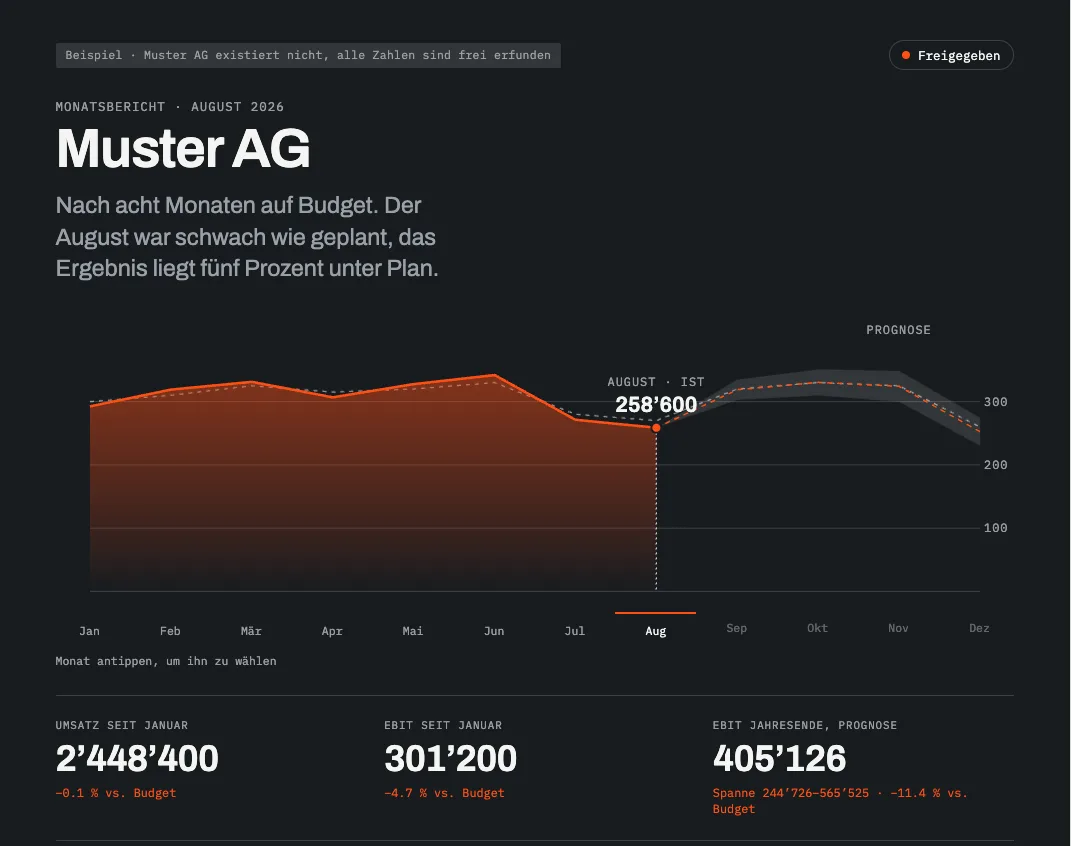
Continuous forecast and different scenarios
Control
Regular comparison of plan against actual

The idea behind it

End-to-end automation means: simplify the process first, then automate the whole path.

Automating a single click is quick; almost any simple Excel function can do it. What costs you time is the complicated path before and after, where data is passed from hand to hand again and again. When that path is cleaned up first and then runs from beginning to end without manual steps — with checking built in — that is end-to-end automation.

Wherever this page says “continuous process chain”, that is what it means.

  1. 01Simplify the process
  2. 02Export the data
  3. 03Prepare
  4. 04Reconcile
  5. 05Build the report
  6. 06Approve
  7. 07Submit

Why skopa

Why a first conversation with us is different.

Practice, not presentation

In the conversation we show you a real, running system — not a slide deck.

Clean up first, digitise second

This stops inefficient workflows from simply running wrong, faster.

You set the degree of automation

You define precisely what runs automatically and where manual approval is needed. For official filings (VAT, payroll, statistics) approval is the norm; for the internal monthly report it is usually unnecessary.

Measurable success

Hours saved, errors avoided — at month end you see in black and white whether it paid off.

Emanuel Flury, founder of Skopa

The founder

“For nearly ten years I led automation projects inside large corporations. In the end, management control still hung on a handful of Excel files that one person assembled by hand — without anyone being able to make sense of the contents any more. That gap is exactly what we close at Skopa: we clean up the processes first, and automate them second.”
Emanuel FluryFounder, Skopa GmbH
More about us →

What we believe

Three principles you may hold us to.

01

Simplify first, automate second.

A bad process does not get better with software; it only gets bad faster. Before a line of code exists, the process is reduced to what matters.

02

People decide, systems process.

Where a decision has consequences, the person stays responsible — backed by a clear audit log. Where there is nothing to decide, the system processes the data automatically. We draw that line together.

03

Start pragmatically, extend sensibly.

We do not sell oversized software for a modest problem. And because the software is yours, you decide whether we keep the technology current.

Three of eight points. You get to hear the other five in the intro call.

Intro call

Which Excel file costs you the most time every month?

No obligation and concrete: we look at one real routine of yours — from export to filing — and tell you honestly whether and where automation pays off.

30 minutes · analysis of one of your monthly Excel processes · no charge